Monday, 29 December 2014

Top Upcoming Smartphones In 2015

Competition was really ramping up this year, forcing Samsung's operating profit margin to tumble, propping up LG and Sony, and easing the pressure on HTC. The biggest winners, however, were the Chinese companies like Xiaomi, Huawei, Lenovo and Oppo, which managed to churn out excellent value-for-money proposition, paving the way for their handsets not only in China, but attracting some global spotlight, too
Given this trend of increased competition, we can reasonably expect great handsets from the first half of next year as well, when the big phone makers, save for Apple, are traditionally introducing their flagships. From the CES expo in January, to the MWC one in the spring, and everything further, we are awaiting for Sony, Samsung, HTC, Huawei, Xiaomi and more to chip in, that's why we are rounding up five of the best smartphones that can be expected with reasonable certainty based on rumors and leaks in H1. 
While there are a host of smartphone makers in the market with a number of devices aimed at breaking the barrier in technology, this surely isn't the last time we will see hefty innovations being made in the handsets in the sector.
2014 has anyway been a brilliant year in terms of smartphone releases. We have seen the likes of HTC One M8, Samsung Galaxy S5, Sony Xperia Z3 and the Apple-made iPhone 6 hit the ground running. And although it's the end of the year, we are still far away from the smartphone juggernaut offering more handsets.
The coming year is also set to be one of the massive ones in terms of handset releases. We will get to see more new Nexus smartphones and tablets, new Samsung handsets, and obviously a fresh new iPhone. And the list just keeps growing.


Samsung Galaxy S6


The flagship Samsung Galaxy S5 has been on sale for a while now and the firm has seen disappointing sales so it's time to look forward to the Galaxy S6 which is codenamed Project Zero. but the manufacturer still remains the largest phone maker in the world, and the most profitable one after Apple. You can bet that all Samsung execs have taken notice from the S5 underpeformance, and will be coming out in full swing with the S6. Expected to be announced around the MWC expo in the beginning of March, the S6 might feature two versions - one with a dual-edged flexible display, and a standard piece with a 5.2" Quad HD panel, Snapdragon 805/810 processor, high-res camera with OIS, and a brand new design featuring more premium materials for the chassis.

Samsung Galaxy S6 Rumored Key Features


  • 5.5 Inch 1440x2560 px display
  • Super AMOLED
  • Android v5.0 (Lollipop)
  • Octa core 2000 MHz processor
  • 20 MP Primary Camera
  • 5 MP Secondary 
  • 3G,
  • WiFi,
  • NFC 
  • 32 GB Internal Memory,
  • Expandable up to 128 GB 
  • 4 GB RAM 
  • 3300 mAh Li-Polymer battery

Samsung Note 5


Everyone always bangs on about Samsung's Galaxy S line-up, but it's the Note series that really impresses. The Note 4 was unveiled at a Samsung Unpacked event prior to September's IFA Trade show (3 September 2014), and right now sits at the top of our fastest smartphone and best phablet charts. Like the new iPhone the Note 5 won't be released until September 2015, but it's going to be well worth the wait.

Last 2 years have been something out of imagination and out of sorts with each and every manufacturing giant coming into the groove. With Samsung and Google showing consistency over the past 2 years, the likes of HTC, Nokia, Motorola and Sony have also chipped in. The top 10 smartphones last year included Samsung Galaxy Note 3, Samsung Galaxy S4, LG G2, Nexus 5, Moto X etc. Among all these, the smartphones from the Korean giant Samsung has been the most talked about. In the last 10 months, talks about Galaxy Note series from Samsung have heated up and the excitement among the tech-geeks have reached another level.


Rumored Key Features


  • A 5.9 inch 4K SUPER AMOLED display pumping out 600+ ppi.
  • 4GB RAM Internal storage capacity.
  • 16GB, 32GB and 64GB which would be further expandable upto 128GB. 
  • Aluminium finished edges with an all metallic curved body. 
  • Will have the latest Android version which ever be present.
  • It will even feature an Octa core processor clocked at 2.9Ghz with a 64 bit architecture which will be the Exynos variant and a Quad Core Snapdragon 808 variant.
  • Finger print sensor and retina scanner is more than likely to be included. 
  • An 18 Megapixel, 1/3″ sensor camera with f2.0 Aperture and 4K recording capabilities.
  • 5 Megapixel wide angle front facing camera for selfies.
  • Knox Security mode and Heart rate sensor.
  • Super Battery Saver mode along with Wireless Charging
  • Stylus S pen and Compatible Gear 4.0.


Apple IPhone 7


The iPhone 6 and 6 Plus were released in September, and in the months leading up to that the rumour mill went mental. Be prepared for more of the same with the iPhone 7, which will launch in September 2015 running iOS 9. As always, we're expecting a faster processor and some upgraded specs, but little change to the design.
Rumored Key Features Expected that the iPhone 7 might have a screen size bigger than that of the iPhone 6 Plus Speculations of having a quad-core A8 processor A 14 megapixel camera is also speculated iPhone 7's memory could be 256GB or even higher a quad-core A8 processor or even higher is expected 4G equipped providing better connectivity A new battery technology is expected to be in the works to provided extended hours of usage


Rumored Key Features 


  • Expected that the iPhone 7 might have a screen size bigger than that of the iPhone 6 Plus Speculations of having a quad-core A8 processor
  • 14 megapixel camera is also speculated
  • iPhone 7's memory could be 256GB or even higher
  • Quad-core A8 processor or even higher is expected
  • 4G equipped providing better connectivity
  • A new battery technology is expected to be in the works to provided extended hours of usage


HTC one M9


We are massive fans of the HTC One M8, and we just can't wait for a better version of the phone. Little is known about the HTC One M9, but you can bet your last pound that there will be one. And that it will be an extremely desirable handset. Based on HTC's previous form, the Android Lollipop-based HTC One M9 won't be here in time for MWC 2015, but we can expect to see it around March.

This might not be the official title, as the speculation is HTC will stray away from the One titling scheme, and yet the phone is expected to be announced in March, at the MWC expo, and be stuffed to the gills with specs. Reports claim it will have a 5.5-inch 2560 x 1440 display, 3GB of RAM, a Snapdragon 805 SoC, and a 3500 mAh battery, which are the expected upgrades. But, the HTC One M9 is also supposed to feature a 16-megapixel camera with optical image stabilization, meaning HTC could well be leaving behind the UltraPixel hardware. Also, given that Apple purchased Beats, HTC had to find a different audio partner,and that new partner could well be Bose. And, HTC may use an aluminum silicon-carbide composite for the body this time. We can't wait.

Rumored Key Features


  • 5.2-inch screen with 1440 x 2560 resolution
  • 2.5GHz snapdragon 805 processor
  • Android 5.0 is believed to be pre-installed
  • Unit offering 64GB of native storage One with 128GB of memory available
  • Higher MP camera on


Sony Xperia Z4


Sony updates its flagship handsets every six months, so with the Sony Xperia Z3 released in September 2014 we can expect the Sony Xperia Z4 in March at IFA (running 2- to 5 March 2015). The Xperia Z4's specifications have yet to be confirmed (as has the phone itself), although rumour has it that it will be a super-fast Android Lollipop smartphone with an octa-core processor and a Quad HD screen

First things first, as the Xperia Z4 announcement seems to be just around the corner, with the CES expo in Las Vegas commencing in a month or so. There are conflicting rumors on this one - from "Sony will pull out all stops" and intro a monster with 5.4" QHD panel, to an info one insider sent us that says Sony will keep using 1080p display resolution, but up the chipset to Snapdragon 810. As for the camera, all agree that it will be Sony's newest stacked 21 MP model that allows for real-time HDR stills, and has 192-point AF tech for shooting blur-free fast moving objects.

Rumored Key Features 


  • 5.2inch 2,560x1,440 QHD display
  • Pack a 64-bit quad-core Qualcomm Snapdragon 810 Processor, paired with an Adreno 430 GPU
  • A whopping 4GB RAM
  • Run Google's Android 5.0 Lollipop software


 LG G4


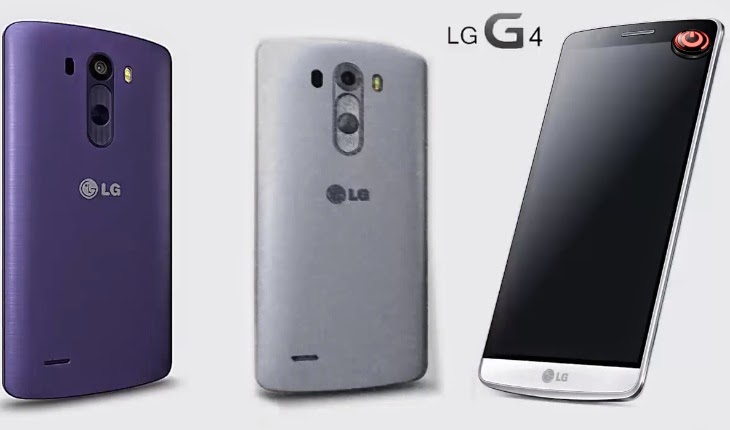
We stand by our statement that the LG G3 is the very best phone you can buy in 2014. Things can only get better with the LG G4. The LG G3 was officially released in the UK at the end of June 2014. The LG G4 should be here around the same time next summer

Not to be outdone by the competition, LG will probably try to usher in its G4 flagship no later than a year after the G3, which pegs it for a May announcement, and a June release. Nothing has been heard about it so far, but an LG exec said breaking the 700ppi barrier is on the menu, plus LG display introduced the display panel with the thinnest bezel recently, so we can expect more innovation from the G4 in the screen department, besides an eventual pixel density increase. We are also looking forward to an even better screen-to-phone-size ratio, and a higher-resolution camera with OIS. Given the release timeframe, a Snapdragon 810 chipset has the biggest chance to go into the G4, too.


Rumored Key Features 


  • Octa-core processor features
  • LTE-A Cat 6 network capabilities,giving users the ability to access 4G speeds that reach up to 300mbps
  • The Nunclun packs four 1.5GHz ARM Cortex-A15 cores for the tough stuff and four 1.2GHz ARM Cortex-A7 cores for the lighter lifting 
  • Expected to be anywhere between 15-17/20.7 megapixels

OnePlus Two


The OnePlus One is an amazing phone if you've managed to get hold of one. It's priced from £229 but has the spec to match a £600 smartphone, hence OnePlus marketing it as a 2014 flagship killer. The OnePlus Two will more than likely be a 2015 flagship killer. (If it can work out is supply-and-demand issues in time.) OnePlus is still struggling to meet demand on its OnePlus One phone. Don't expect to see this one (and certainly not get your hands on it) until at least the middle of 2015. And that's if it ever arrives


Rumored Key Features


  • OnePlus Two might have a smaller footprint. 
  • 5.5-inch JDI 1080 full HD display with 401 pixels per inch
  • It runs CyanogenMod 11S based on Android 4.4 
  • 13 MP rear-facing camera
  • 5 MP front-facing camera
  • Uup to 64 GB storage capacity
  • Powered by Qualcomm Snapdragon 801 processor with 2.5 GHz


Microsoft Lumia 1030


It's do or die time for Microsoft's Lumia phone department, as the maker hasn't released a flagship phone for a while, and potential customers were flying away in droves nor knowing what will happen after Microsoft acquires Nokia anyway. The Lumia 930 was released in April, so the rumored first Microsoft Lumia flagship, the 1030, might appear in the spring next year, too. It is expected to sport a 5.5" Quad HD panel, Snapdragon 810 chipset, 3 GB of RAM, and a sweet new PureView camera with the jaw-dropping 50 MP of resolution, not to mention four HAAC mics for excellent surround sound capture.


Rumored Key Features


  • 5.8 inch Quad HD display
  • Windows 8.2 OS
  • Feature a Snapdragon 805 processor
  • 3 GB of RAM plus 
  • 32 or 64 GB of storage, a microSD card slot
  • 41 megapixel Pureview back camera and an 8.7 megapixel front camera 
  • 4300 mAh battery and supports wireless charging

Thursday, 30 October 2014

How to use Titanuim Backup on android


Titanium Backup has been one of the most popular apps on the market for some time, and with good reason. It can be used to backup all your important app dada, system data, and even WiFi passwords on your handset.

Now, Android is a very stable operating system, and it’s pretty rare to run into a system or app killing bug. Even so, it’s better to be safe than sorry, you never know when a crippling update or malicious app might cause a problem. If you’re planning on removing apps using your newly found root permission or are planning to install custom versions of Android, then backing up your device is essential.

First things first, you’ll need a rooted handset before you can use Titanium Backup. Following that the app will need to be granted root permissions on your handset, but that’s simple enough. You’ll be prompted by Superuser once you run Titanium Backup, and can select to give it permanent access so you won’t be prompted again.

One word of caution before we proceed. If you’re using Titanium Backup to restore apps in between installing ROMs DO NOT attempt to restore system apps or their data across ROMs, as this will cause all sorts of crashes. Individual apps work fine, but system data will be incompatible.

Now that everything is setup we can begin.

Performing a mass backup

At first glance, Titanium Backup doesn’t appear to have the friendliest looking interface, the black and grey theme could certainly use a makeover. But don’t let that put you off, everything you need is actually very easy to find.

Frustratingly though, probably the most useful tool for performing a mass backup is actually hidden in another menu, rather than on the Backup/Restore tab where you’d think it would be. Instead, click the Menu button on your handset, and then select the “Batch actions” option under the “General” section, it should be the second option on the list.

TI making a backup

Batch actions can be accessed from your devices menu button, or via the icon in the top left of Titanium’s home screen.
The all-important backup section is located right here, giving you a wide variety of options regarding app and system data. System data includes Bookmarks, WiFi information, calendar events, etc. If you’re performing a backup for the first time then want to use the “Backup all user apps + system data” option, or at the very least the “all user apps” function. Clicking “Run” will present you with several more options to refine exactly what you’d like to backup. Once you’re satisfied with the selection, tap the green tick in the top right to begin the backup.

Patience is the key here as this can take a while, especially if you have lots of large apps installed.

If you’ve performed backups in the past and simply want to make a backup of newer apps you’ve installed recently, the “Backup new user apps” option on the “Batch actions” menu is the best choice. Alternatively, you can use the “Backup/Restore” tab on the Titanium homepage to select individual apps to backup.

Creating a recovery backup .zip file

Whilst the above backups will protect you from most bugs, they won’t be of much use if you experience a severe error that prevents your device from booting properly, such as corruption in a system file, or a bugged out launcher. This is where recovery compatible .zip files come in handy, as the backup can be restored without having to boot into Android. However, this is a donate version only option, but might be worthwhile if you’re changing ROMs a lot.

Head on over to the batch options again and scroll down until you see the “Recovery Mode” category. Here you can select the apps that you’d like to include in the backup .zip file, choose between apps or data only, and name the .zip file appropriately so that you can remember what it is.

If you ever need to recover your device using this boot file, enter ClockworkMod recovery and choose install zip from SDCard.

Scheduled backups

Generating a backup every time you install a new app is a bit of a pain, and it’s unlikely that anyone will remember to make a backup every week or month anyway. Fortunately, Titanium Backup now includes a scheduled backup option.

Over on the main menu tap the “Schedules” tab and you’ll be presented with two options. The first choice labelled “redo backups for modified data” will schedule backups only for app data which have been changed since the last backup. This could include games or changes make to specific app data.

TI schedule
The schedule has plenty of options to control automatic backups, so you don’t have to mess around with Titanium regularly.
The second option is probably the most important, as it will backup any new apps, system data, and updates since the previous update. Click “edit” to make changes to the schedule. There are all the necessary options to adjust the time and date of when backups are generated, but users can also set the charge state of the device required before making a backup, so as to prevent shutdowns mid backup, and there’s also a choice regarding filters and what to do once the backup has completed.

Restoring from backup

Alright, you’re protected in case your handset suffers a minor meltdown, but the next important step is being able to restore your apps and settings should anything go wrong.

In the batch actions, yet again, you’ll find a list of options for mass restoring your data. “Restore missing apps with data” will replace any content that is missing from your handset after a wipe. Alternatively restoring all apps with data will replace any existing apps with the backed up versions of them created earlier. There’s also a rather helpful option to only restore newer versions of user apps if you’re reinstalling your system.

However, the option that’ll you’ll most likely be interested is the “restore missing apps + all system data” option, which will put everything back to where it was when you created the backup. Although I can’t stress enough, that system data shouldn’t be restore if you’re switching ROMs.

TI restore options

Batch and individual restores can both be performed. There are also some additional commands when looking up the options for each app.
If you discover that a specific app has developed a fault, say after a bugged update, and you want to restore it to a previously saved version, then this can be done by clicking on the backup/restore option on the main page. Here you can pick the specific app or piece of data from the list. Once tapped, a list of backups will appear along with a list of other functions to create backups, etc. Here you can manage your individual app backups, or can restore the app to a specific date by clicking on the corresponding restore button.

Managing bloatware

Whilst looking at the specific apps you’ll probably have noticed the Freeze function. Freezing apps is a handy tool that will allow you to completely stop apps from running without having to uninstall them. Usually this is used on factory installed apps that you don’t want to use. This option is a paid for only function, but it’s very helpful if you want to stop an irritating tasks from running or to see how your handset will react before uninstalling a piece of software.

Root permission also means that Titanium Backup can be used to uninstalled unwanted apps and bloat ware. A word of caution before doing this with any pre-installed software, uninstalled essential apps can cause force close errors and even render your handset virtually unusable if not done with care, so I thoroughly recommend backing up your apps and system first, preferably with a recovery zip file too.

Special features

That’s the really important stuff out of the way, but Titanium backup includes plenty of additional advanced features if you want to make the most out of your backups.

Firstly, backup data can be imported from by going to Titanium’s main menu and scrolling down to the import backup option. So you don’t even need to store all your backups on your handset, the files can easily be moved back and forth from your PC to your phone.

TI extra options
Slower compression will save on storage space, but be prepared to wait a little while while backups are performed.
If you’re short of internal memory storage, there’s also the option to move apps to the SD card. However, this will cause certain apps to malfunction, so it’s only recommended to use on software which don’t integrate closely with any other part of Android, such as games.

Titanium Backup features many more options under the configurations menu, including tweaks to the type of compression used to create backups, the maximum number of backups to keep for each app, and whether or not to store market links for apps. In fact, apps can even be disconnected from the marketplace, so automatic updates can be left on for apps but then manually disconnected for certain apps, if you so desire.

Cloud backups

An extra feature for those who purchase the PRO edition is the ability to send backup data to various online services, including Dropbox and Google Drive. Although not essential, these options are very helpful if you need to wipe your SD card, or if your SD card ever develops a fault. To enable syncing to one of these services, tap your phone’s menu button and then go to “Preferences”, the options are under “cloud sync settings”.

And that concludes our guide on Titanium Backup. Hopefully that’s everything you need to protect your handset from unexpected faults.


:Video:


Wednesday, 29 October 2014

3D Analyzer For Better Game Experience (Windows)


3D Analyze is a program to anayze and test the efficiency of your 3D card, and improve it noticeably for 3D gaming. It's especially designed to help those of you who own older PCs to run new games, based on the increasing demands these games have on software and hardware. It will also help you future-proof your new PC against future developments in gaming. This way you'll avoid costly upgrades to your hardware. What 3D Analyze does is to emulate DirectX, and you can also fool a modern game into thinking your graphics card is right for it, even if it's an old one. And if you have an up to date card you can use 3D Analyze to run games through your TV by forcing 100Hz.


For this 3D Analyze allows you to change the distinct characteristics of your card, and test its efficiency (DirectX merits special attention). With it you can optimize your PC's efficiency, above all if your CPU will permit it, although still with a low range card. This 3D Analyze program supports Direct3D as much as OpenGL, whichever it you may have, to optimize your system. For this you only have to select where to find the execute command for the chosen game.


3D Analyze is very easy to use and you will get instant results. It doesn't matter whether you have a new or an old graphics card, as this program will help you. And all this for free!


Hack Playstore Using Freedom App


Freedom is an app which enables free in-app purchases provided by the google play store. One important point though, is that you must have your device rooted before using this app. If you don't know, what rooting is, then you must first search it, collect some information and then root your phone. We have provided a FAQ below, too.

You can use it in any game, but there's no guarantee that all of the games and apps work with it. However it works on most of the games and you must therefore surely give it a try. There are newer versions out every week or month, so maybe all the games/apps can be hacked with it in the near future.


Installation Instructions:


Follow these instructions carefully to get freedom working:


1. Install the downloaded apk file in your phone
2. First go to step 7, if freedom works then its all done. If it doesn't work then follow the below steps in sequence.
3. Download and install Market Unlocker from here.
4. Open Market Unlocker => Tick Enable Unlocker
5. Now, swipe over to the left (Market Tab)  => Scroll until you find Russian MTS 25001 => Select it
6. Go to Settings => Date & time => Select time zone => Moscow (Optional).
7. Open Freedom => Choose any app or game => Wait for the process => Enjoy free in app purchases.


Wednesday, 15 October 2014

Android 5.0 Lollipop Features List


Key Android Lollipop 5.0 Features


Android 5.0 Lollipop is Google’s latest operating system update for smartphones, tablets and even Android Wear-running smartwatches. It's arriving in the coming weeks and the newly announced Motorola Nexus 6 and HTC Nexus 9 tablet will be among the first devices to run on it. 

New look, dubbed Material


The first thing you'll notice about Android 5.0 is that it looks quite different to the current Android 4.4 Android, and it's not – as we once thought – like the experimental Experience UI used in the Nexus 5. 

Google has come up with a new interface look, called Material. It's a lot more vibrant that current Android, and it makes much more use of interface layers. This is quite the opposite of recent trends in UI design, which have all been about making interfaces as flat and simple as possible. Material may be simple, but it's not flat.

As part of the new Material interface, Google is also introducing two new widgets. The first is a more power-efficient RecyclerView widget, which can be used for features like scrolling through Contacts. The second is a new CardView widget, which has a very Google Now-inspired feel and should ensure widgets run smoother.

Real-time Shadows


The depth is not just about the way the interface is laid out, either. Android 5.0 introduces real-time generated shadows for interface elements.

This should really help to spruce-up the look of Android, giving it some of the visual tactility of iOS 7. We have seen attempts at this kind of more substantive look in some third-party custom interfaces before, but they generally don't get it right. 

Others end up looking busy, and there are often performance hits to any visual flashiness. But we don't expect any of that with Android 5.0. 

Redesigned nav soft keys


The look of the nav buttons that are a key part of Android have been changed as well. Their functions seem to be the same as ever – back, home and recent apps – but the look seems to have been pilfered from a PlayStation controller. 
A triangle, circle and square do manage, strangely enough, to encompass what each of the soft keys are for well enough, though. And the extra simplicity of this is no doubt all a part of the Material look. 

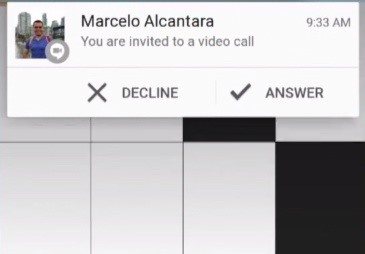
Dynamic 'heads up' notifications


Another element of Android 5.0 that we've seen in some third-party Android interfaces is heads-up notifications. These pop-up on top of whatever you're doing, meaning you don't have to go to an app or drag down the notifications bar to find out what's going on when your phone beeps. 


More coherence across tablets, phones and PCs


Google is keen to big-up that the Material look is going to be fairly consistent between phones, tablets, desktops and laptops. It wants to offer that smooth cross-platform feel that you get when you really buy into the Apple universe, with an iPhone, iPad and MacBook. 
Of course, on the PC front Google is only really going to have access to the Chrome interface – it can't reskin Microsoft's Windows. But the look on a laptop isn't a million miles removed from the tiles of Windows 8.

Redesigned Gmail


It's not just the Android interface that has been given a refresh. The Google apps have too. Much more colour has been injected into Gmail, and the look of the app is both a lot cleaner and more modern.
The square avatar pics of current Gmail have also been traded-in for circular ones. 
It seems highly likely that you'll have control over what apps can send you these pop-up notifications. As otherwise they'll become very, very annoying. 

Expanded notifications


This is something Google introduced in recent Android updates and now users will be able to view notifications in more detail in three different ways. There's text, inbox and image all of which can provide you with additional context for the notification. It's something that Android Wear smartwatch owners are also going to benefit from greatly as well.

The idea is to evolve one of Android's core features to be more useful and deliver the information when you really need it.

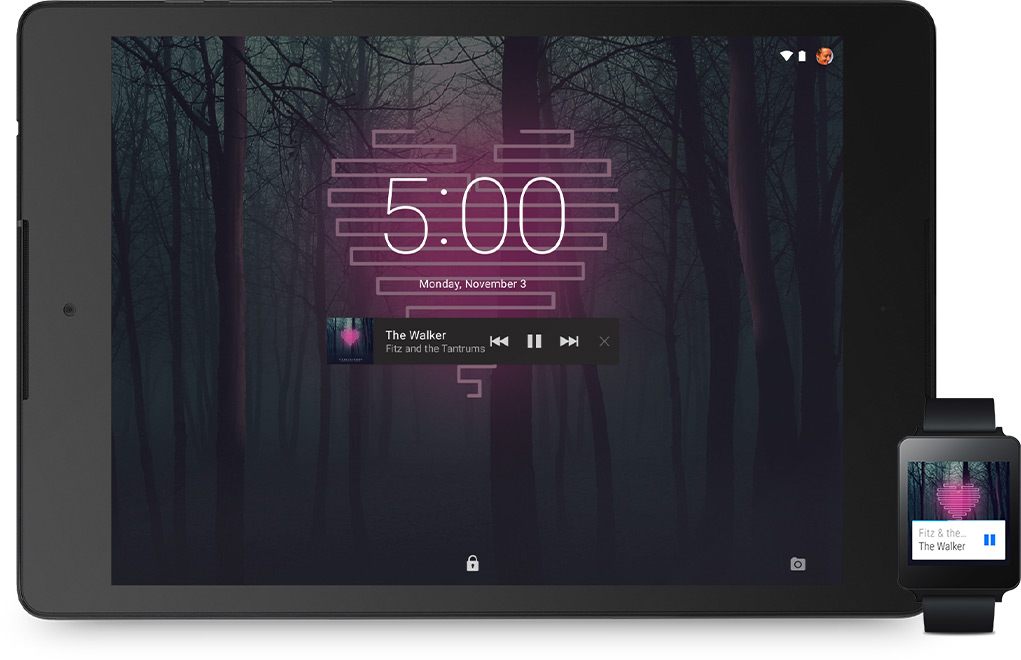
New lock screen notifications


Notifications also have a real spot on the lock screen. And, again, this is something that has been common for some time in many custom Android interfaces. 
Each notification shows up as a little bar across the screen in high-contrast fashion, making them super-clear. It looks as though four different notifications can be displayed on the lock screen at once on a normal-size phone.

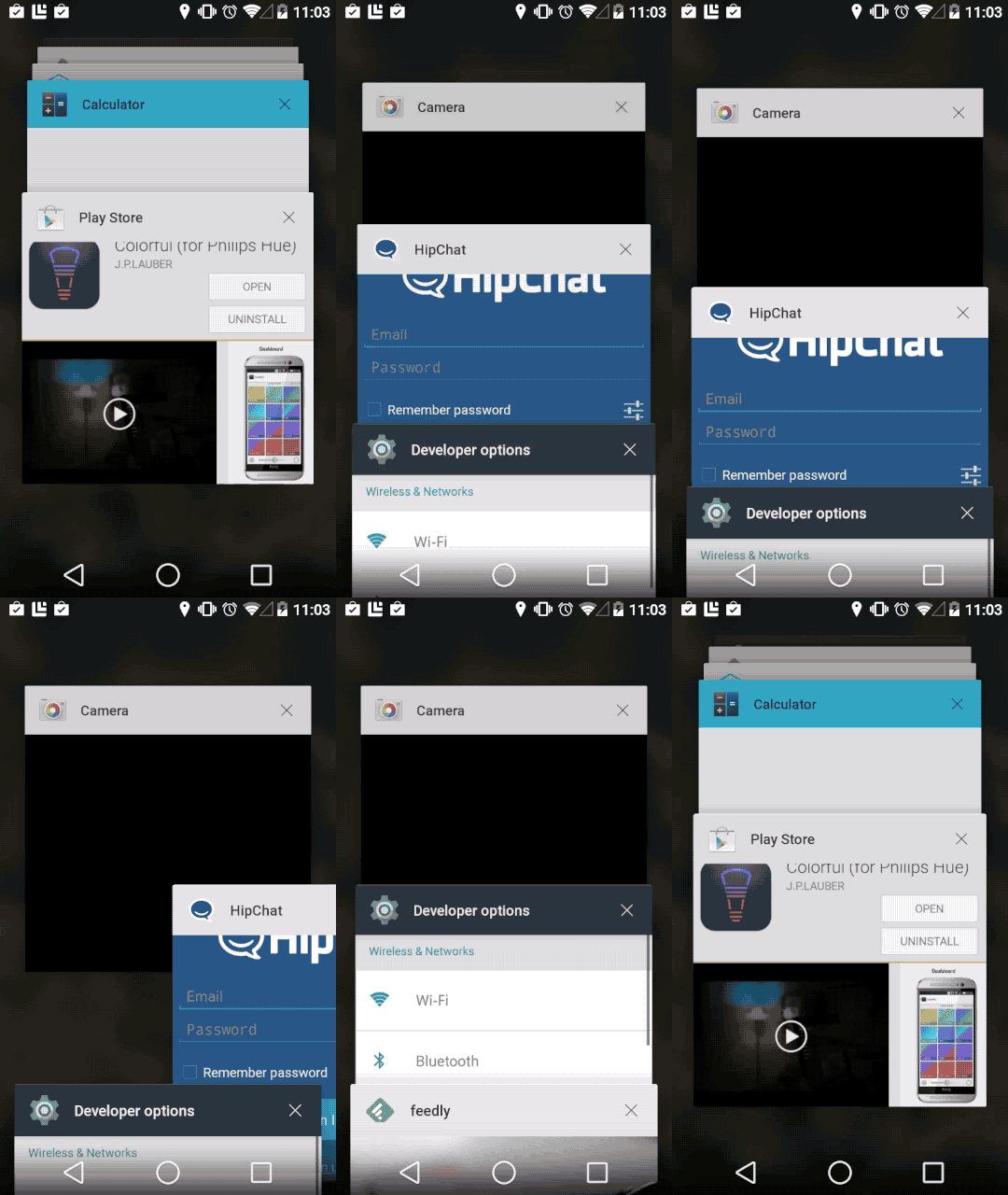
3D multitasking


A minor visual tweak of Android 5.0 L is the new multitasking menu. It still shows your 'recent' apps, but rather than being displayed as a 2D scroll of apps, it's now a 3D cascade of app tiles. 
It looks quite similar to the tabs screen of the Chrome browser for Android – no surprise there. The look of the Android take is better, though – sharper, simpler and with good use of those new realtime shadows. 

Direct links to apps from Google searches


Developers will now be able to have links to their apps take the place of websites in web searches. What this means is that you'll be able to head directly to a specific part of an app right from the Chrome browser on your phone. 
This feature has been accessible to a handful of apps to date, but now it'll be available to all developers. If you're worried about being launched from Chrome into some dodgy app, don't be. Just as lesser sites don't tend to feature too highly in your search results, ropey apps won't either. 

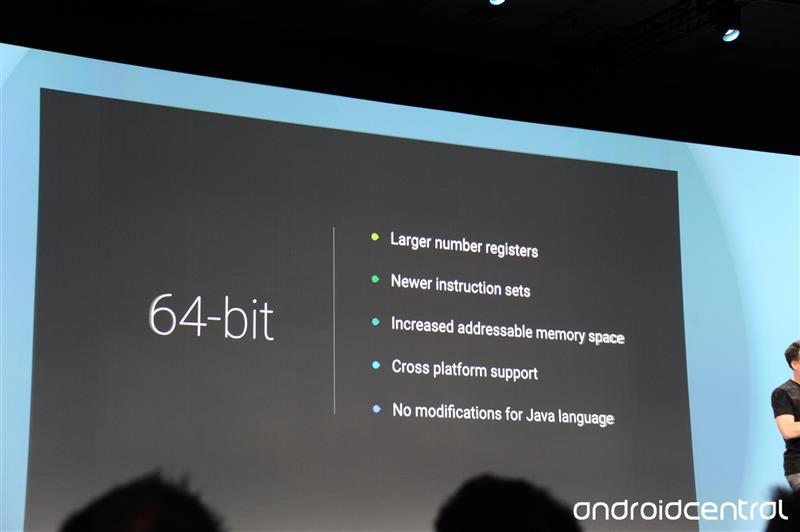
64-bit CPU support


One new feature we knew was coming – support for 64-bit CPUs. As 64-bit CPUs clearly designed to work with Android devices have already been officially announced, this one was obvious. 
As well as letting many more instructions take place simultaneously, having a 64-bit CPU really lifts the lid on how much RAM Android phones/tablets can actually make use of. With a 32-bit processor the limited address space means that only so much RAM memory can be accessed at once. 

Android TV


While not a core part of the Android system, Android TV is a huge development in the Android universe. It's a version of the platform designed for your TV, and it'll eventually be built into set top boxes and TVs.
You'll control the thing with your Android phone, and will be able to play Android games, watch video and do pretty much anything you can with your Android phone.

Improved GPU support


Google has improved the coding of Android's execution of graphics, allowing for much more advanced visuals. It has been dubbed an 'extension pack', and will finally make top-end processors start to make a bit more sense.
The extension pack enables tesselation, geometry shaders, computer shaders and ASTC texture compression. The latter is an advanced image compression algorithm that will allow for highly effective reduction in the size of art assets. 

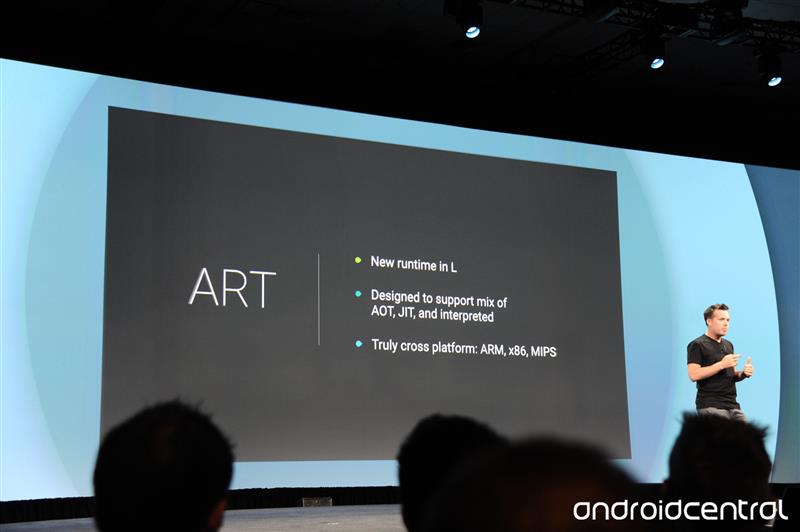
ART runtime is in


Android 5.0 L switches over to the ART runtime. If you've read our Android 4.4 tips and tricks article you'll know that this is something people with recent Android phones have been able to try out for themselves for a while.
At present Androids use the Dalvik runtime as standard. ART is significantly quicker, but uses a bit more storage space for apps. It's a fair trade off in our opinion.

Smartwatch as authentication


One of the funkiest little additions in Android 5.0 L is a new way to bring your phone out of standby securely. Android Wear watches will work as an authentication tool, meaning you won't need a password to unlock your phone if you're wearing your watch. We're not quite sure yet exact what tech is used to do this. But it is neat.
BUT, of course, if you get mugged your attacker is probably going to nick your Android smartwatch as well as your shiny new Galaxy S6 mobile phone. But it should at least stop your friends from being able to tweet on your behalf should you nip of to the lav for a minute. 

Support for USB audio


One of the new APIs of Android 5.0 L is USB audio. This means you'll be able to transmit digital audio right from a phone's microUSB port, bypassing the DAC stage used when you listen through a headphone jack. 
What will this mean? It opens up an Android phone to being a genuine audiophile source when paired with a decent outboard USB DAC, and could mean we start to see USB headphones – something Apple is rumoured to be working on through Beats. The Nexus 5 supported USB audio output, but it is not native to all Android 4.4 devices. 

Battery efficiency optimisation

Android 5.0 L gets some new battery features, including a reworked Battery Saver mode. Android 4.4 falls well behind the competition in this respect – where phones like the Galaxy S5 have extreme power-saving modes on tap, the basic Android 4.4 battery saver is rather rudimentary. 

The lock screen will also tell you how long your phone will take to charge when plugged in – a clever little tweak that seems so obvious now it's in place. 

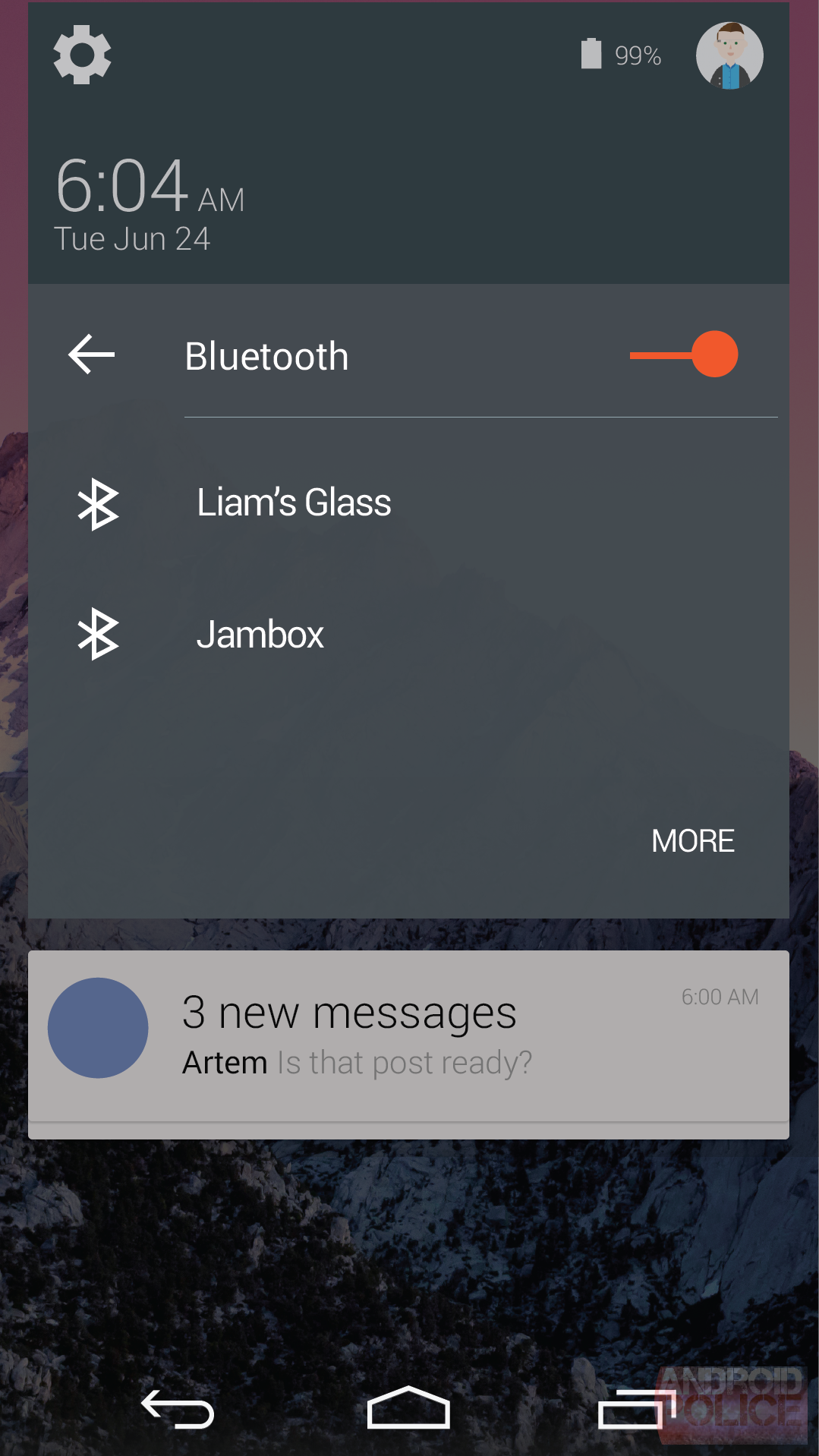
Bluetooth 4.1 support


Android 5.0 L offers native support for Bluetooth 4.1. Top-end phones have Bluetooth 4.0 these days, but what's the difference?

Bluetooth 4.1 doesn't clash with 4G signal like Bluetooth 4.0, and it gives manufacturers much more control over the timeout times of the connection. This gives much more scope for controlling power consumption. Bluetooth 4.1 also improves connectivity, letting Bluetooth peripherals talk to each other more easily. 

Android Auto

A major new bit of Android 5.0 L is Android Auto. This is a bit like Apple's CarPlay – it's an in-car system that runs off your Android phone. 

You jump into your car and your Android 5.0 L mobile will start transmitting Android Auto to the screen on your car's dashboard. Its interface looks quite a lot like Google Now and Android Wear, and will of course let you GPS navigate to wherever you want to go. We imagine it'll be a lot more open than CarPlay too. 

Thursday, 9 October 2014

English-Malayalam Dictionary For Windows 8.1

English Malayalam Dictionary application for Windows Phone. As it is using an offline database you don't require an active internet connection. A must application for any Malayalee.


Malayalam language is a language of Dravidian origin and is spoken in India, mostly in the state of Kerala. More than 35 million people use it all over the world, according to a recent study. Besides being spoken by the population of Kerala, the language is also used by a large crowd of expatriates in America, the Middle East, Europe and Australia.

Since the popularity of this language is undeniable, the need for a dictionary to translate English words to Malayalam became more stringent by the day.

English Malayalam Dictionary can prove itself useful, especially to people who originate from Kerala and other Malayalam speaking Indian countries.


iTools An Alternative For iTunes

iTools is a free alternative to iTunes. It is a simple and complete solution to manage your iPad, iPhone, iPad or iPod Touch.


If you have gone through the iTunes steps, you will not be disoriented with iTools. The software incorporates the main features of iTunes. The style is similar with a menu bar on the left.

With iTools, you can access the entire filesystem of your iDevice from your PC without having to bog down your system with iTunes. The software allows you to manage your media library and sync music, video and photos with your Apple device. iBooks is also supported.

With the iTools app installed, managing your device Apple is a nothing more than a breeze. You can uninstall or make backups of your applications in one click and check for available updates.

Among the other features of iTools is the ability to manage and edit all the content of your contacts, messages, notes, calendar and call history.

If you are looking for an alternative to iTunes, here is a complete and excellent solution from the folks in Hong Kong.

iTools can manage contacts, synchronize phone data and backup phone data.

iTools features and highlights:


  • Easily convert between MP3 format
  • Desktop management profiles
  • Cleans rubbish files from your iDevice
  • Manage contacts and SMS text messages
  • Share data between devices


iTools is licensed as Freeware for Windows (32-bit and 64-bit) operating system / platform from iphone tools without restrictions. iTools 2014 Build 0520 is available to all software users as a free download (Freeware).


Wednesday, 8 October 2014

iOS 7 Cloud activation By Hacktivate Tool


A new activation lock bypass


  • just add this to you host file on your pc or mac
  • 162.253.154.177 albert.apple.com
  • Then open itunes
  • Press Yes and Continue


How to use


1) Download and install the utility iPhone4_Hacktivate_Tool
2) Open iPhone4_Hacktivate_Tool
3) Put your iphone4 into DFU mode
4) Press Button 1 to run the ssh_rd tool
5) Wait until ssh_rd tool is done
6) Run number 2 to mount your devices filesystem
7) Now run number 3 to copy the needed files over to hacktivate your iphone 4
8) Your device will reboot and go into restore mode
9) Press the exit recovery buttIon
10) :-)
For More Info Visit


Increase IDM Speed BY IDM Optimizer

Internet Download Manager as we said is the best download manager right now available as compared to any other download manager like DAP, Microsoft Lightweight Download Manager, Orbit and many others. Its used to download files much faster hence accelerating downloads with this tool is quiet easy and automated. We even posted a nice tutorial on how you can download torrent files using IDM (Internet Download Manager) and even we hosted a nice IDM License Keys Giveaway that went pretty well, it will be refreshed again soon.

Accelerate IDM Downloads using IDM Optimizer


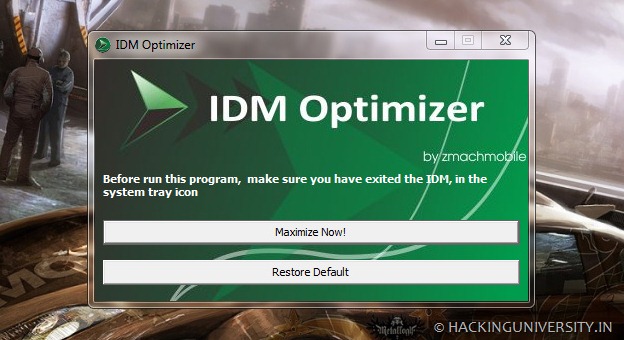
 Well now we just got our hands on IDM Optimizer, it’s a small utility which boosts your IDM speed by modifying some registry entries like it will change Connection Speed, Connection type, Max Connection Numbers and some other few entries. So this is what above kind of Window you will see when you will fire up the IDM Optimizer software. So it has a simple Maximize Now button which when clicked will popup a note to restart IDM so that it can take effect. Well you can see it also has a Restore Default button which will restore all the settings which IDM came with you can use that if you think that you are not getting good speeds.

Increase IDM Download Speed using IDM Optimizer


  • Download IDM Optimizer Tool


  • Now make sure IDM is installed on your PC, as this tool will only optimize IDM if its physically present on your system.


  • Now just fire up your IDM Optimizer and than you will see window like above just click on Maximize Now and you will get a note asking you to restart your IDM do that and once restart your PC.


  • That’s it now your IDM is boosted with speed, try to download any file and check out if speeds are good or not.


  • If you want to restore your default settings than you can click on Restore Default.

That’s it guys now you have boosted your IDM with Speed, optimized it for faster downloads have fun, well all these settings could be tweaked manually but this one is the fastest and easiest way to bypass all that manual working, so hopefully this will work for you and will provide you some boosted speeds.


All Rights Reserved. 2014

Powered By Masterfones Lmtd | Published By Masterfones.tk Designed By : MfCreation

Top