Showing posts with label Windows. Show all posts

Wednesday, 29 October 2014

3D Analyzer For Better Game Experience (Windows)


3D Analyze is a program to anayze and test the efficiency of your 3D card, and improve it noticeably for 3D gaming. It's especially designed to help those of you who own older PCs to run new games, based on the increasing demands these games have on software and hardware. It will also help you future-proof your new PC against future developments in gaming. This way you'll avoid costly upgrades to your hardware. What 3D Analyze does is to emulate DirectX, and you can also fool a modern game into thinking your graphics card is right for it, even if it's an old one. And if you have an up to date card you can use 3D Analyze to run games through your TV by forcing 100Hz.


For this 3D Analyze allows you to change the distinct characteristics of your card, and test its efficiency (DirectX merits special attention). With it you can optimize your PC's efficiency, above all if your CPU will permit it, although still with a low range card. This 3D Analyze program supports Direct3D as much as OpenGL, whichever it you may have, to optimize your system. For this you only have to select where to find the execute command for the chosen game.


3D Analyze is very easy to use and you will get instant results. It doesn't matter whether you have a new or an old graphics card, as this program will help you. And all this for free!


Thursday, 9 October 2014

English-Malayalam Dictionary For Windows 8.1

English Malayalam Dictionary application for Windows Phone. As it is using an offline database you don't require an active internet connection. A must application for any Malayalee.


Malayalam language is a language of Dravidian origin and is spoken in India, mostly in the state of Kerala. More than 35 million people use it all over the world, according to a recent study. Besides being spoken by the population of Kerala, the language is also used by a large crowd of expatriates in America, the Middle East, Europe and Australia.

Since the popularity of this language is undeniable, the need for a dictionary to translate English words to Malayalam became more stringent by the day.

English Malayalam Dictionary can prove itself useful, especially to people who originate from Kerala and other Malayalam speaking Indian countries.


Wednesday, 8 October 2014

Increase IDM Speed BY IDM Optimizer

Internet Download Manager as we said is the best download manager right now available as compared to any other download manager like DAP, Microsoft Lightweight Download Manager, Orbit and many others. Its used to download files much faster hence accelerating downloads with this tool is quiet easy and automated. We even posted a nice tutorial on how you can download torrent files using IDM (Internet Download Manager) and even we hosted a nice IDM License Keys Giveaway that went pretty well, it will be refreshed again soon.

Accelerate IDM Downloads using IDM Optimizer


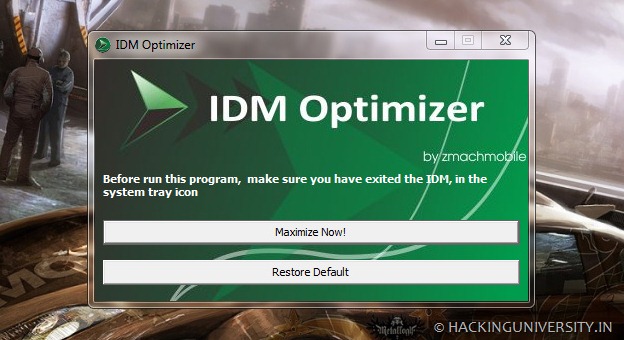
 Well now we just got our hands on IDM Optimizer, it’s a small utility which boosts your IDM speed by modifying some registry entries like it will change Connection Speed, Connection type, Max Connection Numbers and some other few entries. So this is what above kind of Window you will see when you will fire up the IDM Optimizer software. So it has a simple Maximize Now button which when clicked will popup a note to restart IDM so that it can take effect. Well you can see it also has a Restore Default button which will restore all the settings which IDM came with you can use that if you think that you are not getting good speeds.

Increase IDM Download Speed using IDM Optimizer


  • Download IDM Optimizer Tool


  • Now make sure IDM is installed on your PC, as this tool will only optimize IDM if its physically present on your system.


  • Now just fire up your IDM Optimizer and than you will see window like above just click on Maximize Now and you will get a note asking you to restart your IDM do that and once restart your PC.


  • That’s it now your IDM is boosted with speed, try to download any file and check out if speeds are good or not.


  • If you want to restore your default settings than you can click on Restore Default.

That’s it guys now you have boosted your IDM with Speed, optimized it for faster downloads have fun, well all these settings could be tweaked manually but this one is the fastest and easiest way to bypass all that manual working, so hopefully this will work for you and will provide you some boosted speeds.


KGB Archiver For Windows 8.1


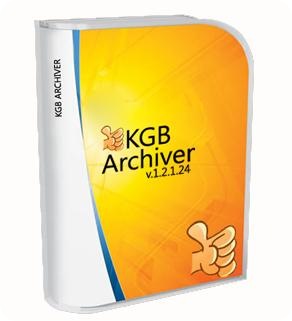
KGB Archiver is not your regular file compressor. It makes all the difference in the world, size-wise, because it can create the tinniest archives. This is due to the fact that its compression rate is amazing, almost unique in its software category.
Various compression options

This small and seemingly plain software is extremely powerful, and it could easily surpass other products of its kind (when it comes to compression size, not speed).

Archives can be made in either KGB or ZIP format, and compression level can be set from minimal to maximum (with a lot of options in between). Plus, you can secure them by assigning a password, no matter which compression level you choose.
Powerful result at the cost of time

For example, we compressed a file of 1.2MB at maximum level. The process took 30 seconds, and the result weighed 366,5KB. Large file take a lot more than that, obviously. So, yes, KBG Archiver is powerful, but it also takes long time for maximum compression level.
Displays helpful info

During compression, KGB Archiver displays the progress, together with the current size versus the projected size and the remaining time. This information is also available in a little window that pops up if you move the mouse over the application icon in the system tray.

KGB Archiver also places shortcuts in the Explorer context menu, but you can make that disappear from the Options window of the application.

To end with


In conclusion, KGB Archiver is willing to cut down your archives in size, but at the price of a long waiting time for very large files. Considering that it can drastically make a difference, the costs are not that high.


 Download

PASSWORD: goldenrare


All Rights Reserved. 2014

Powered By Masterfones Lmtd | Published By Masterfones.tk Designed By : MfCreation

Top